
- Track changes across shared maps - TPAssist automatically journals changes made to task details, including dates, priority, flags, percentage complete, text markers as well as resource assignment so you have a history, or audit trail, of where and when changes were made to the plan.
- "My Tasks" Resource Filtering in Tree Summarisation - The TPAssist 2007 task tree summary capability has a "Resource Filter" which can be used to manage tasks assigned to one or more individuals.
- Use Team Dashboards - TPAssist 2007's Tree Update and Task Summary also work with Multimaps. Dashboards can be built very easily by linking topics to sub-maps and then running TPAssist 2007 Tree Update in Multimap mode.
- Enable Workflow - Use MindManager and TPAssist to construct workflow tasks, set durations/effort and assign ownership. Also linking them with relationships and automated dates. As you progress your workflow, using TPAssist, you can visually track steps taken and yet to be taken. In addition, because your actions are tracked with-in the map, you have an instant audit trail of your workflow progress.
- Manage Financial Information - TPAssist uses custom properties to capture financial estimates and actual values. Financial values captured via TPAssist will be rolled-up the map to provide the visually means to track estimates and actual details across groups of tasks, maps and Multimaps.
- Consolidate and Publish multi-maps - TPAssist 2007's publish to Microsoft® Excel® capability is multi-map enabled, allowing you to managing complex projects over multiple maps and produce consolidate Work breakdowns, project schedules and other reports.
- Microsoft Project Export with Multimap Support - TPAssist 2007 Microsoft Project publishing capability allows you to managing complex projects over multiple maps and produce a single Gantt chart.

- Manage complex projects - TPAssist 2007 can be used to manage simple groups of tasks or very complex projects.
- Keep an Audit Trail - TPAssist automatically journals changes made to task details, including dates, priority, flags, percentage complete, text markers as well as resource assignment so you have a history, or audit trail, of where and when changes were made to the plan.
- Automatically move dates of interdependent tasks - TPAssist 2007 provides the means to create complex project plans of interdependent activities, whereby dates will move automatically when related activities and tasks are updated and completed.
Known as "Levelling", TPAssist 2007's date automation capability also recognises topic relationship. Relationship can be used to adjust the start and/or end dates of dependant tasks.
- Track and present task status changes - TPAssist provides a Task Status capability that can be used to record and track status for any topic and also the overall map. Changes to status can be painlessly duplicated from topic to map to parent map.
- Track project costs visually - TPAssist uses custom properties to capture financial estimates and actual values. This values will be rolled-up the map to provide the visually means to track any number of financial aspects associated with task, stage/phase, project and portfolio.
- Publish reports to spreadsheets - TPAssist 2007 facilitates effective publishing of your project plans through a series of pre- formatted Microsoft® Excel® spreadsheets.
The publish to Microsoft® Excel® capability draws on several built-in templates to display Work Breakdown Structures (WBS), team To- Do lists, a Resource Planner/Schedule and project Gantt Chart.
- Consolidate and Publish multi-maps - TPAssist 2007's publish to Microsoft® Excel® capability is multi-map enabled, allowing you to managing complex projects over multiple maps and produce consolidate Work breakdowns, project schedules and other reports.
- Analyse project plans via Excel - TPAssist 2007's publish to Microsoft® Excel® capability also provides "pivot source" worksheets, which are flat exports of map topics specifically formatted to facilitate pivot tables, charting and other manipulation to help you analysis and present project details.
- Summarise your resource and project cost estimates in Excel - TPAssist 2007 adds the ability to capture resource costs and then publish the resulting plans into a "quote" style spreadsheet.
- Managed project information - Through TPAssist's semi- structured notes capability, information can be easily embedded in your project maps and then exposed via the Excel based publishing tool.
- Resource Filtering in Tree Summarisation - The TPAssist 2007 task tree summary capability has a "Resource Filter" which can be used to manage tasks assigned to one or more individuals.
- Microsoft® Project Export with Multimap Support - TPAssist 2007 Microsoft Project publishing capability allows you to managing complex projects over multiple maps and produce a single Gantt chart.

- Visualise your progress - TPAssist 2007 is designed to provide you with the visual cues to track and manage the various requests and activities that fill your day.
- Summarise your next action - TPAssist 2007 has a straight-forward reporting tool that can be used to easily identify and manage your tasks based on due date proximity, priorities and flag.
- Work with Multimaps - TPAssist 2007's Tree Update and Task Summary also work with Multimaps. Dashboards can be built very easily by linking topics to sub-maps and then running TPAssist 2007 Tree Update in Multimap mode.
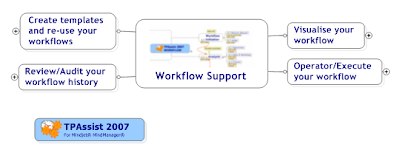
- Visualise your workflow - Use MindManager and TPAssist to construct workflow tasks, linking them with relationships and automated dates.
- Operator/Execute your workflow - TPAssist 2007 automatically records or "journals" your actions and task configuration changes with-in the topic notes. Your actions are also noted in context to which it related, i.e. all parent topics and linked maps.
- Review/Audit your workflow history - As you progress your workflow, using TPAssist, you can visually track steps taken and yet to be taken. In addition, because your actions are tracked with-in the map, you have an instant audit trail of your workflow progress.
- Create templates and re-use your workflows - Use TPAssist to take existing task trees and turn them into new ready to use workflow task trees.

- Take a Birds Eye View - The ease at which individual topic status is rolled- up to a centralised view ensures you can quickly see what has to be done and give you instant satisfaction regarding what you have already achieved.
- Uncover buried task information - Topic Task information with-in your map can become buried when you collapse and filter the hierarchy. You may have Priorities, percentage complete, flags and dates assigned to topics, but none of this will be obvious unless you expand the specific tree.
- Roll-up task details on demand - TPAssist 2007's Tree Update capability rolls-up priorities, percentage complete, dates and flags.
- Roll-up task details automatically - As well as manually, the Tree Update function is performed automatically whenever TPAssist is used to change the priority, percent complete, Start Date, Due Date or Flag.

- Take the pain away from tracking your activities - TPAssist 2007 automatically records or "journals" your actions and task configuration changes with-in the topic notes. Your actions are also noted in context to which it related, i.e. all parent topics and linked maps.
- See your achievement for any given day - TPAssist 2007 also builds and maintains a Journal summary tree. This tree tracks your activities by date and is grouped by year, month and day.
- Turn your ideas in to action plans - TPAssist 2007 provides straight-forward techniques for taking Brainstorming ideas and turn them into Task maps ready to track and act-on.
- Track your activities with-in any number of sub maps - TPAssist 2007 is multi-map enabled supporting task status rollout and also tracking of task and activity progress.


